
Block downloading attachments from OWA
In this scenario
We will demonstrate how to block downloading files from Outlook on the web and only save them to OneDrive using -ConditionalAccessPolicy
PowerShell parameter with set-OwaMailboxPolicy
Applies to: online OneDrive and Sharepoint Online
The ConditionalAccessPolicy parameter specifies the Outlook on the Web Policy for limited access. For this feature to work properly, you also need to configure a Conditional Access policy in the Azure Active Directory Portal.
Note: When you enable a Conditional Access policy, users will no longer be able to access the light version of Outlook on the web. An error message will direct them to use the default premium experience.
Steps
- Connect to PowerShell online management shell for exchange
- Create new OWA mailbox policy
- Crate a group for the required uses to block them from downloading
- Create conditional access policy in azure
- Creating Application enforced restrictions conditional access
- Testing our policy from blocked user and unblocked user
- Confirm it is working fine
- Remove the policy
-
Reference for all the links and commands
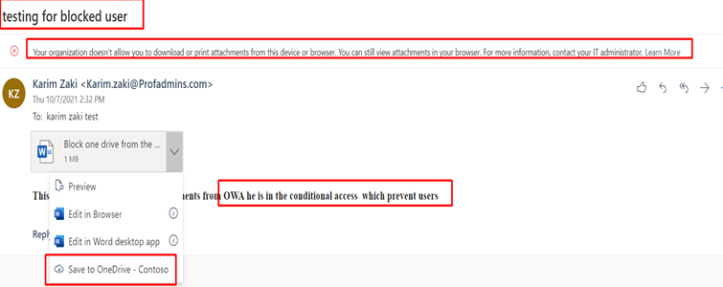
Your organization doesn’t allow you to download or print attachments from this device or browser.
You can still view attachments in your browser. For more information, contact your IT administrator.

Connect to PowerShell online management shell for exchange
Install-Module -Name ExchangeOnlineManagement
#Installing the PowerShell module
Update-Module -Name ExchangeOnlineManagement
#Update to the latest Version
Connect-ExchangeOnline
# connect to exchange online
Get-OwaMailboxPolicy | Fl -Property ident*
Set-OwaMailboxPolicy -Identity OwaMailboxPolicy-Default -ConditionalAccessPolicy ReadOnly
Get-OwaMailboxPolicy  | select-object ConditionalAccess*
First get the OWA mailbox policy and check it is name

Create new OWA mailbox policy
-
ReadOnly: Users can’t download attachments to their local computer and can’t enable Offline Mode on non-compliant computers. They can still view attachments in the browser.
-
ReadOnlyPlusAttachmentsBlocked: All restrictions from ReadOnly apply, but users can’t view attachments in the browser.
Set-OwaMailboxPolicy -Identity OwaMailboxPolicy-Default -ConditionalAccessPolicy ReadOnly

Then get the configuration
Get-OwaMailboxPolicy | select-object ConditionalAccess*

Optional you can crate group to apply conditional access to or just apply it to all users
Crate conditional access policy now and choose the group you want And choose office 365exhange online
Note: I have added sharepoint also cause I ll create the same restrictions for OneDrive in a later post

Use app enforced restriction

Testing
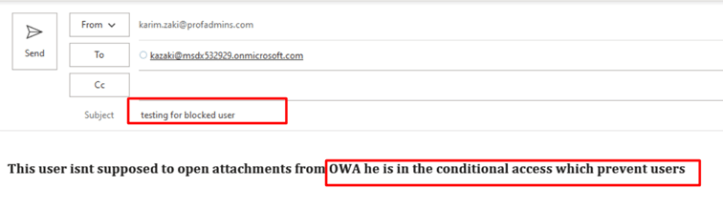
Now I sent to the user who isnt member of the blocked group in azure conditional access
He supposed to be able to download


Confirm it is working fine
Testing from user in a blocked group
This user isnt supposed to open attachments from OWA he is in the conditional access which prevent users
If you want to remove the policy
Remove-OwaMailboxPolicy -Identity name
Reference for all the links and commands
- Conditional Access in Outlook on the web for Exchange Online – Microsoft Tech Community
- Limit Access to Outlook Web Access, SharePoint Online and OneDrive using Conditional Access App Enforced Restrictions | Modern Workplace Blog (vansurksum.com)
- Set-OwaMailboxPolicy (ExchangePowerShell) | Microsoft Docs
- Session controls in Conditional Access policy – Azure Active Directory | Microsoft Docs


Thanks for the guide. How long does this take to take effect? Doesn’t seem to be working for me.
LikeLike
Immediately if you configured everything correctly
LikeLike
Make sure of the conditional access
LikeLike
Hello,
Thank you for the post, it was very usefull, it is stoping to download from OWA, but still can download copy and safe as from sharepoint, how to block that too.
you mentioned that you would post it.
LikeLiked by 1 person
This rule for exchange. For sharepoint you can create conditional access
LikeLike
How to restrict downloading from sharepoint too?
LikeLiked by 1 person
It is working in OWA, but when open a document in SharePoint web apps, still can download copy of the document. how to prevent that too.
thank you,
LikeLiked by 1 person
This is for owa for sharepoint you do another conditional access from azure ad and sharepoint
LikeLike
Thank you for the response,
I have added the Office365 SharePoint Online to apps for actions. and selected for the Session:
Use App Enforced Restrictions and Use Conditional Access App Control (Block Downloads (Preview)), but still when opening a file in Sharepoint online it give me the option to download a copy.
in your post you had mentioned that you will do the article for SharePoint restriction too, I am not sure if you have done that or not.
thank you,
LikeLike
There is a link in the article on how to do it check it i think it is working
LikeLike
You can still “Save As” the email and get to the document that way.
LikeLike